
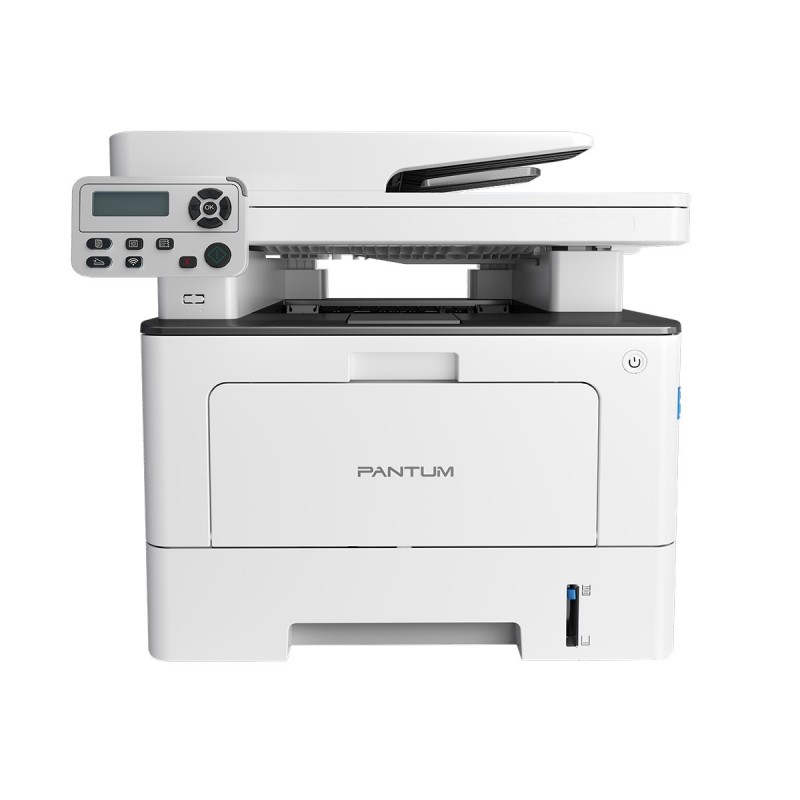
Pantum BM5100ADW Multifunction Printer
Rs. 94,999
In stock - Cash on Delivery all over Pakistan
Pantum BM5100ADW Multifunction Printer is a professional monochrome laser printer designed for busy offices and businesses that need printing, copying, and scanning in one device. It delivers up to 40 pages per minute, supports automatic two-sided printing, and features a 50-page DADF for efficient document handling. With dual-band Wi-Fi, USB, Ethernet, mobile printing, and expandable paper capacity, it provides a flexible solution for demanding office workflows.
Pantum BM5100ADW Multifunction Printer
A modern office often needs to handle both physical and digital documents throughout the day. Employees may print reports, copy invoices, scan signed forms, or share documents electronically with customers and colleagues. Using separate machines for each task can make the workspace crowded and create unnecessary delays. The Pantum BM5100ADW Multifunction Printer brings essential document functions together in one professional office solution.
This monochrome laser multifunction printer combines printing, copying, and scanning, making it suitable for businesses that need more than a basic printer. Its fast output, automatic duplex printing, automatic document feeding, and network connectivity are designed around the needs of busy workplaces.
Fast 40ppm Office Printing
Speed is one of the most important considerations when a printer is shared by several employees. The Pantum BM5100ADW Multifunction Printer can print at up to 40 pages per minute on A4 paper, with a first-page output time of up to 6.9 seconds under specified conditions.
This makes it suitable for offices where employees regularly produce multi-page documents. Reports, invoices, business proposals, forms, statements, and other paperwork can be processed without relying on a slow personal printer.
Fast printing is particularly useful during busy periods when several users may need to complete document-related tasks at the same time.
Automatic Two-Sided Printing
The Pantum BM5100ADW Multifunction Printer supports automatic duplex printing, allowing compatible documents to be printed on both sides of the paper without manually turning each page.
Duplex printing can be useful for lengthy reports, internal documents, proposals, manuals, and other multi-page files. Printing on both sides can also help reduce paper consumption and make large documents easier to handle.
For businesses that print substantial amounts of paperwork every month, automatic duplex functionality can become an important part of an efficient printing workflow.
Printing, Copying and Scanning in One Machine
The biggest advantage of the Pantum BM5100ADW Multifunction Printer is its combination of three essential office functions. Users can print documents, make copies of physical paperwork, and scan documents for digital use from the same device.
This all-in-one approach can save valuable workspace and eliminate the need to purchase separate equipment for each function.
For a small or medium-sized office, one multifunction device can become the central document station used by different employees throughout the working day.
50-Page DADF for Document Handling
Scanning and copying multiple pages manually can take considerable time. The BM5100ADW includes a 50-page DADF, designed to help users process multiple documents more efficiently. It also supports automatic two-sided scanning.
This can be particularly useful when digitizing contracts, reports, forms, applications, invoices, or other multi-page paperwork.
Instead of placing each page individually on the flatbed, users can load a batch of compatible documents into the automatic document feeder and allow the machine to process them according to the selected settings.
Fast Duplex Scanning
The Pantum BM5100ADW Multifunction Printer supports one-pass two-sided scanning, which is useful when working with documents printed on both sides. Pantum lists scanning speeds of up to 24 ppm/48 ipm for A4 scanning, depending on the scanning mode.
This feature can make a difference for offices that frequently convert paper documents into digital files.
Businesses can use scanning for document archiving, email communication, digital record keeping, and transferring paperwork into computer-based workflows.
Dual-Band Wi-Fi Connectivity
Modern offices often have multiple devices that need access to shared equipment. The Pantum BM5100ADW Multifunction Printer supports dual-band Wi-Fi on both 2.4GHz and 5GHz networks.
This gives businesses additional flexibility when configuring their office network.
Wireless connectivity can also make printer placement easier because the machine does not necessarily have to be positioned beside a computer with a direct USB connection.
USB and Ethernet Connectivity
Along with Wi-Fi, the printer provides USB and network connectivity. Pantum lists USB and Ethernet among its connection options, allowing the device to be incorporated into different office setups.
Ethernet can be useful for a traditional wired office network, while USB can provide a direct connection to a compatible workstation.
Having multiple connection methods allows businesses to choose an installation approach according to their existing infrastructure.
Mobile Printing Support
The Pantum BM5100ADW Multifunction Printer supports mobile printing technologies including AirPrint, Mopria, and Pantum's mobile application.
This can be helpful for employees who work with documents on smartphones and tablets.
Instead of transferring every document to a desktop computer first, compatible mobile devices can be used as part of the printing workflow. This provides additional convenience in workplaces where mobile devices are regularly used.
Convenient Copying Features
Copying is more than simply producing a duplicate page. The BM5100ADW supports a range of copy functions, including ID copy, receipt copy, N-up copy, clone copy, poster copy, collated copy, and watermark copy. It can also enlarge or reduce copies from 25% to 400%.
These options give businesses greater flexibility when reproducing different types of documents.
For example, identification documents, receipts, forms, and multi-page paperwork can be handled according to the required copy format.
Large Paper Capacity
The Pantum BM5100ADW Multifunction Printer comes with a standard 250-sheet paper input tray and a 60-sheet multipurpose tray. Optional 550-sheet paper trays can also be added, with up to two optional trays supported, allowing maximum input capacity to reach 1,410 sheets.
This expandable capacity can be valuable for businesses with higher printing requirements.
A larger paper supply means employees can complete longer print jobs without repeatedly stopping to refill the main tray.
Flexible Media Handling
The printer supports a variety of paper sizes and media types. The standard and multipurpose trays can accommodate different media weights, with Pantum listing support for common formats such as A4, A5, A6, B5, Letter, Legal, Executive, Folio, envelopes, and other supported sizes.
This makes the device useful for offices where printing requirements are not limited to one standard document format.
Businesses can use the main tray for regular office paper while the multipurpose tray can be used for other compatible media.
High-Yield Toner Options
The Pantum BM5100ADW Multifunction Printer uses a separate drum and toner design. Pantum lists a 30,000-page drum unit and toner options that include 3,000-, 6,000-, and 15,000-page capacities depending on the cartridge selected.
High-yield toner options can be useful for offices that print frequently because they can reduce the frequency of consumable replacement.
Businesses can choose toner capacity according to their actual document volume and operating requirements.
Suitable for Small and Medium Businesses
The Pantum BM5100ADW Multifunction Printer can be particularly useful for small and medium-sized businesses that want one central device for everyday document management.
Employees can use the printer for invoices, reports, quotations, contracts, forms, statements, and correspondence. They can also scan paperwork for digital storage or make copies of documents when required.
Combining these functions in one machine can help businesses maintain a cleaner and more organized office environment.
Useful for Accounting and Administrative Work
Accounting departments regularly handle invoices, financial statements, receipts, forms, and other paperwork. The multifunction capabilities of the BM5100ADW make it suitable for these document-heavy environments.
Users can print financial documents, copy physical records, and scan paperwork into digital systems. The automatic document feeder is especially useful when working with multiple pages.
Suitable for Educational and Professional Environments
Schools, training centers, legal offices, consulting firms, service businesses, and other professional organizations can also benefit from a multifunction printer.
Teachers and administrators may need to copy worksheets and scan documents, while professional offices may need to reproduce contracts, forms, and client paperwork.
The Pantum BM5100ADW Multifunction Printer provides the flexibility required for these different workflows while maintaining a focus on monochrome document production.
One-Step Driver Installation
Setting up office equipment can sometimes be complicated, especially for users without dedicated technical support. Pantum highlights one-step driver installation for the BM5100ADW and includes a USB data cable with the printer.
A straightforward installation process can help users get the machine connected to their workstation or office network more quickly.
This is particularly useful for small businesses where the printer may be installed and managed without a dedicated IT department.
Designed for Regular Office Workloads
The Pantum BM5100ADW Multifunction Printer is designed for regular document production rather than occasional printing alone. Pantum lists a recommended monthly volume of 1,000 to 10,000 pages on its regional product specification, with a listed monthly duty cycle of up to 100,000 pages.
The appropriate workload should always be based on the manufacturer's recommended volume for the specific market and operating conditions.
Its combination of fast output, automatic duplexing, high-capacity paper options, and multifunction capabilities makes it suitable for offices with consistent document requirements.
Why Choose Pantum BM5100ADW?
The Pantum BM5100ADW Multifunction Printer is a strong option for businesses looking for a professional monochrome all-in-one solution. It combines 40 ppm printing and copying, automatic duplex printing, a 50-page DADF, automatic two-sided scanning, dual-band Wi-Fi, USB and Ethernet connectivity, mobile printing, and expandable paper capacity.
Whether your business needs to print invoices, scan contracts, copy receipts, produce reports, or manage everyday office paperwork, this multifunction printer can bring those tasks together in one centralized device.
For workplaces that need speed, connectivity, document-feeding convenience, and flexible paper handling, the Pantum BM5100ADW Multifunction Printer provides a practical office solution. Its combination of printing, scanning, copying, duplex functionality, and wireless connectivity makes it well suited to modern businesses that want to keep their document workflow efficient and organized.