
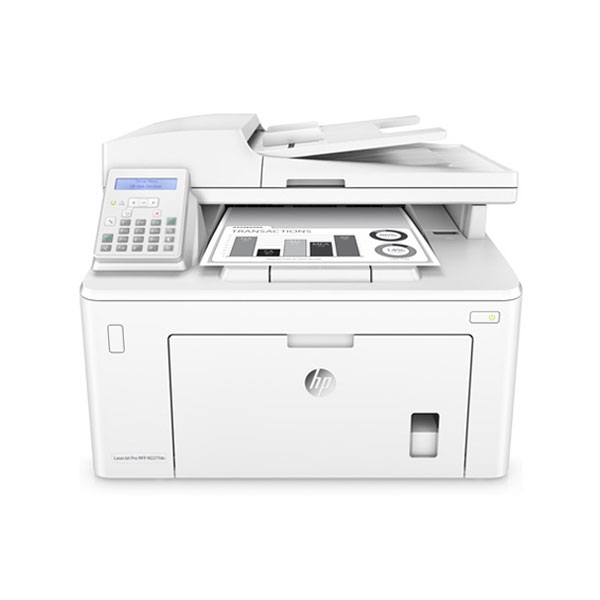
HP LaserJet MFP 227fdn
Rs. 34,000
In stock - Cash on Delivery all over Pakistan
HP LaserJet MFP 227fdn is a professional monochrome multifunction printer designed for offices and businesses that need printing, scanning, copying, and faxing in one compact device. Its automatic two-sided printing, automatic document feeder, Ethernet networking, and USB connectivity make it suitable for everyday office workflows. From invoices and reports to contracts, forms, and business correspondence, this HP LaserJet MFP provides a practical solution for handling a wide range of document tasks.
HP LaserJet MFP 227fdn
Modern offices handle documents in many different forms. A business may need to print an invoice, scan a signed contract, copy an important form, or send a fax to another organization. Using separate machines for each task can take up valuable space and make document handling less convenient. The HP LaserJet MFP 227fdn combines several essential office functions into one professional monochrome laser device.
Designed for business environments, this multifunction printer brings together printing, scanning, copying, and faxing. It is a practical choice for offices that want one central machine for everyday document management.
Four Essential Office Functions
The main advantage of the HP LaserJet MFP 227fdn is its multifunction capability. Instead of maintaining separate devices for common document tasks, users can handle printing, scanning, copying, and faxing from one machine.
This can be particularly useful in offices where employees regularly switch between physical and digital paperwork. A document can be printed for a customer, scanned into an electronic record, copied for internal use, or faxed when required.
Having these functions together can also help keep the workplace more organized.
Fast Monochrome Printing
The HP LaserJet MFP 227fdn uses monochrome laser technology, making it well suited to offices that primarily produce black-and-white documents.
Businesses commonly print invoices, reports, forms, contracts, letters, statements, quotations, and administrative paperwork. These documents generally do not require color, so a dedicated monochrome laser machine can be a practical solution.
Fast laser printing also helps employees complete routine document jobs efficiently, particularly when several pages need to be produced at once.
Automatic Two-Sided Printing
Paper efficiency is important for businesses that print documents regularly. The HP LaserJet MFP 227fdn supports automatic duplex printing, allowing users to print on both sides of the paper without manually turning every page.
This is useful for reports, contracts, proposals, internal documentation, and other multi-page files.
Two-sided printing can also make printed documents more compact, which helps when storing or carrying larger documents.
Automatic Document Feeder
Scanning and copying a large number of pages one by one can be time-consuming. The HP LaserJet MFP 227fdn includes an automatic document feeder that helps users process multiple pages more conveniently.
This can be especially useful when handling contracts, reports, applications, invoices, and other multi-page documents.
Instead of manually placing every sheet on the scanner glass, users can load a batch of pages into the feeder and use the appropriate scanning or copying function.
Convenient Scanning
Businesses increasingly need to convert physical documents into digital files. Signed paperwork, forms, invoices, identification documents, and records may need to be scanned for storage or electronic communication.
The HP LaserJet MFP 227fdn includes scanning functionality, allowing users to digitize physical documents without purchasing a separate scanner.
This can simplify everyday office workflows and make it easier to move information between paper-based and digital systems.
Easy Document Copying
Copying remains an important office function even in increasingly digital workplaces. Employees may need additional copies of forms, invoices, identification documents, reports, or other paperwork.
With the HP LaserJet MFP 227fdn, users can make copies directly from the multifunction device.
This is useful for businesses that regularly provide physical copies to customers, maintain duplicate records, or distribute paperwork internally.
Built-In Fax Function
Although many businesses now rely on email and cloud communication, faxing remains relevant in certain professional environments. Some organizations still use fax for formal document exchange and administrative communication.
The HP LaserJet MFP 227fdn includes fax functionality, giving businesses access to this traditional communication method without requiring a separate fax machine.
This can be valuable for offices dealing with organizations that still require or prefer fax-based document transmission.
Ethernet Network Connectivity
A shared office printer should be easy to integrate into the workplace network. The HP LaserJet MFP 227fdn provides Ethernet connectivity, allowing compatible computers and workstations to access the device through a wired network.
This is particularly useful for offices with multiple employees.
Instead of installing a separate printer at every desk, businesses can position the multifunction machine centrally and allow authorized users to access its document functions through the network.
USB Connectivity
The printer also provides USB connectivity for compatible devices. This gives users an additional way to connect the machine when a direct connection is preferred.
For an individual workstation, USB can provide a straightforward setup, while Ethernet is useful when the device needs to serve multiple users across an office.
Designed for Office Workflows
The HP LaserJet MFP 227fdn is designed around the everyday needs of professional environments. Employees can print documents, scan paperwork, make copies, and use fax functionality without moving between different machines.
This centralized approach can save workspace and make document handling more efficient.
For small businesses, professional offices, administrative departments, and other organizations, having one multifunction device can simplify equipment management.
Ideal for Invoices and Financial Paperwork
Accounting and administrative departments deal with large amounts of paperwork. Invoices, receipts, statements, payment documents, reports, and forms are frequently printed, copied, or scanned.
The HP LaserJet MFP 227fdn can support these workflows through its combination of printing, scanning, and copying functions.
For example, an office can print an invoice, scan a received document, and create a copy of paperwork without using separate machines.
Useful for Contracts and Legal Documents
Professional offices frequently work with contracts and other important documents. These documents may need to be printed for signatures, scanned for digital records, copied for different parties, or faxed to another organization.
The multifunction design of the HP LaserJet MFP 227fdn makes it suitable for these types of workflows.
Its automatic document feeder can also be useful when processing multi-page paperwork.
Suitable for Small Businesses
Small businesses often have limited office space and budgets, making multifunction equipment particularly useful. Instead of purchasing separate printing, scanning, copying, and faxing equipment, a business can centralize these functions in one machine.
The HP LaserJet MFP 227fdn can be used in retail offices, service businesses, accounting offices, educational organizations, professional practices, and administrative workspaces.
Its wired networking makes it suitable for shared office environments where multiple computers need access to the printer.
Professional Monochrome Output
Black-and-white printing remains essential for many businesses. Letters, invoices, reports, contracts, forms, and internal records can generally be produced without color.
The HP LaserJet MFP 227fdn focuses on monochrome laser printing, making it appropriate for text-heavy professional documents.
A dedicated monochrome workflow can also be practical for offices where color printing is not part of their everyday requirements.
Automatic Duplex for Reports
Long reports and business documents can quickly become bulky when every page is printed on one side. Automatic duplex printing allows users to produce supported documents using both sides of the paper.
The HP LaserJet MFP 227fdn can therefore be useful for multi-page reports, proposals, training material, internal manuals, and other longer documents.
This feature can help reduce paper usage and make documents easier to organize.
Centralized Document Station
One of the benefits of a multifunction printer is the ability to create a central document station within the office. Employees can go to one machine whenever they need to print, scan, copy, or fax.
The HP LaserJet MFP 227fdn can serve this role effectively in a small or medium-sized workplace.
Centralizing document equipment can also reduce the need for multiple machines and simplify maintenance and supply management.
Suitable for Educational Environments
Schools, academies, training centers, and educational offices regularly produce worksheets, notices, forms, reports, and administrative documents.
The HP LaserJet MFP 227fdn can provide a useful document solution for these environments. Staff can print educational material, scan paperwork, make copies, and use fax functionality when necessary.
Its multifunction design can be especially useful in administrative departments that handle a mixture of physical and digital records.
Useful for Administrative Departments
Office administration involves many small document tasks throughout the day. Forms need to be printed, paperwork copied, records scanned, and documents occasionally faxed.
The HP LaserJet MFP 227fdn brings these functions together, allowing administrative staff to manage several common tasks from one workstation.
This can help reduce unnecessary movement around the office and create a more streamlined document workflow.
Practical for Shared Workgroups
The HP LaserJet MFP 227fdn can be installed as a shared network device for compatible users. This makes it suitable for departments where several employees regularly need access to printing and other document functions.
A central multifunction machine can be more practical than maintaining individual printers and scanners at every workstation.
Easy Integration Into Existing Offices
Businesses often already have established computer networks and office workstations. Ethernet connectivity allows the MFP to fit into a traditional wired network environment.
USB provides an additional direct connection method when needed.
This flexibility makes the HP LaserJet MFP 227fdn suitable for offices with different approaches to device connectivity.
Why Choose HP LaserJet MFP 227fdn?
The HP LaserJet MFP 227fdn is a practical all-in-one document solution for offices that need more than basic printing. It combines monochrome laser printing with scanning, copying, and faxing while also providing automatic duplex printing and network connectivity.
Its multifunction design can help businesses save workspace and reduce the need for several separate devices.
Whether you need to print invoices, scan contracts, copy forms, fax documents, or produce everyday office reports, the HP LaserJet MFP 227fdn provides a centralized way to manage these tasks.
For small businesses, professional offices, administrative departments, educational organizations, and other document-intensive workplaces, the HP LaserJet MFP 227fdn offers a convenient combination of essential office functions in one machine.